Assets (Interior Page)
Assets are reusable, structured content elements that are used on multiple pages.

Assets in Modern Campus work similarly to "blocks" in Cascade. If you can place your content—whether text or images—into a block, that block (or Asset) can then be deployed within a page wherever the Asset is placed
They can be used on both Landing Pages and Interior Pages. Unlike Snippets, each Asset always maintains the same form and cannot be configured on a page-by-page basis. These plain text Assets are typically created by your department. Below are visual examples of some of the most commonly used Assets in the CMS for Interior Page.
Be sure to read the Getting Started page to see where to find the Asset option in the MC Editor. (Hint- It's the rotating arrow icon.)
Table of Contents:
View Asset Instructions
Web Content Assets
Snippet as Reusable Asset | Asset Type: Web Content
Not availible at this time. We are hoping that Modern Campus gives us this option in the future.
Image as Reusable Asset | Asset Type: Web Content
(Select: The name of your image Asset that you created in drop down.)
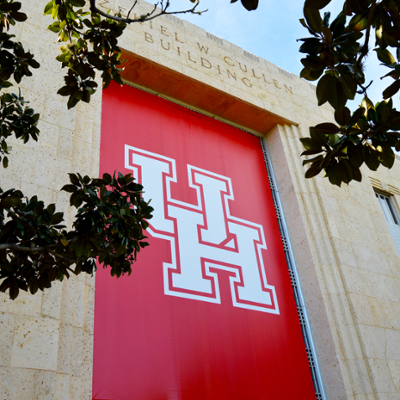
For the example, we used the 'finance-sidebar-img' image as a Web content Asset, which would be used for placing this image of a building in the right sidebar across multiple pages. Feel free to create your own reusable Web Content image Asset.
Text / Link as Reusable Asset | Asset Type: Web Content
(Select: The name of your created Asset in the drop down.)
For the example, we used the 'ai-disclaimer' text as a Web Content Asset, which would be used for disclaimers across multiple pages. Feel free to create your own reusable Web Content text/link Asset.
Asian American Studies Center
University of Houston
McElhinney Hall
3623 Cullen Blvd., Room 2003
Houston, TX 77204-5023
Plain Text as Reusable Asset
(Select: The name of your Plain Text Asset in the drop down.)
Reusable Text (Type: Plain Text)
This department created a clearly labeled notice placed at the end of a webpage to inform users about data access restrictions. It helps set expectations for who can view the content and how to access it securely. Your department can create your own reusable text box Asset to be used across multiple pages.
Disclaimer: Some of the information on this site may have been prepared with the help of generative AI tools. All content is reviewed and approved by University staff to ensure accuracy, transparency, and alignment with UH System standards. No student data or personal information is ever shared with AI tools, in compliance with FERPA and University privacy policies.
Read more about what ~Plain Text~ Assets are best used for according to Modern Campus docs.
Here's how to create Plain Text Assets as well.
Custom Assets
Reusable Best Value College Asset | Inquire with Web Marketing Team to build for your team
This department created a clearly labeled notice placed at the end of a webpage to inform users about data access restrictions. It helps set expectations for who can view the content and how to access it securely. Your department can create your own reusable text box Asset to be used across multiple pages.

Strategic Planning – Stats Asset | Inquire with Web Marketing Team to build for you
A content block Asset that presents key data points and progress metrics aligned with the institution’s strategic goals.
-
Achieving Top 50 Status
Improving Student Retention, Graduation Rates, Social Mobility, and Alumni Support
-
Enhancing UH's Strategic Priorities
Enhancing Student Career Preparation, Engaging with Our Community, and Achieving Competitive Funding
-
Fostering Student Engagement
Increasing Sense of Belonging, Student Engagement, and Academic Success