Parking permit registration for the fall 2026 semester is approaching, and there are two important phases students should understand: priority renewal and regular registration. Knowing which one applies to you will help ensure you get a permit that works for you.
Priority Renewal
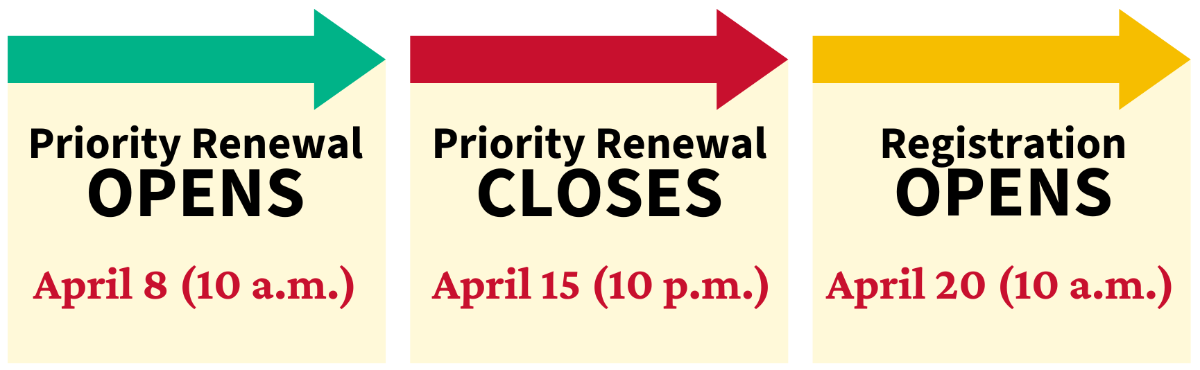
Priority renewal takes place April 8 at 10 a.m. through April 15 at 10 p.m.
This is for current students who already have a valid spring parking permit and want to keep that same permit type for the fall semester.
For example, if you currently have a Zone C permit and want Zone C for the fall, the priority renewal period is designed for you.
You have the entire week-long period to renew. You do not need to log in the moment renewal opens at 10 a.m. April 8. During priority renewal, you are not competing with other students. Renewing simply tells us that you want to keep your current permit for the next semester.
It is very important that you do not forget to renew. Once the renewal period ends, the permit you currently have will be released to all students when regular fall registration opens April 20. At that point, there are no guarantees that you will be able to get it. So if you want to keep your current permit, be sure to renew it before the deadline.
Regular Registration
Regular fall permit registration for students opens April 20 at 10 a.m. This is for all enrolled students who did not participate in priority renewal.
This phase operates on a first-come, first-served basis, and certain permit types can sell out quickly.
Students should register as soon as possible once this phase opens. The later a student waits, the fewer permit options will remain.
If you currently have a spring parking permit but want a different permit for the fall semester, then this is when you get it. For example, if you have Zone C now but want Zone E for the fall, you should wait for regular registration and select your new permit when sales open.
Some Permits Not Eligible for Renewal
Some permits require eligibility checks every semester. Because of that, they cannot be renewed during the priority renewal period. These include:
- Sugar Land permits
- Katy permits
- Apartment permits
- Motorcycle permits
- Monday-Wednesday-Friday permits
- Tuesday-Thursday permits
How to Renew a Permit
- After the renewal period opens, log in to AccessUH using your CougarNet credentials and select the myParking Account icon.
- Look for the message on the main screen that says your permit is eligible for renewal. Select "Details."
- Select "Renew Permit."
- Click the option indicating that you agree with the terms of service.
- Review the renewal information and select "Renew Permit Now."
- In your shopping cart, check the box next to your permit, enter your UH email, and select "Checkout."
Your renewal is complete. A receipt will be sent to your UH email.
Note for Faculty and Staff
Priority renewal is only for student permits. Faculty and staff parking permits work differently. These permits are annual and automatically renew every August without any action required. Faculty and staff keep the same permit until they choose to cancel it or leave the university.