Foreign Currency Transactions
The University of Houston has partnered with Convera USA, LLC and PayMyTuition to provide our international students with options to make international tuition payments. Convera and PayMyTuition offer competitive exchange rates and the convenience of being able to make payments in many international currencies through a local bank.
For detailed instructions on Convera or PayMyTuition, please see below.
Wire Payment Vendors
- Convera USA, LLC
- Students can initiate a wire transfer to the university through Convera by logging into your AccessUH student self-service account and following the instructions below:
-
-
- Select the Finances tab.
- Click Convera- Wire Payment Request.
- Enter payment amount. Note:( The payment amount cannot exceed $10,000. If the total payment due is less than $10,000, the payment is limited to no more than $1,000 above the amount due.)
- Accept terms and conditions and select "next."
- You will then be re-directed to Convera's website.
- Select "Get Quote."
- Complete required information and print confirmation.
- Present confirmation and wire instructions to your foreign bank.
-
Your quote must be presented to and approved by your bank. The transaction is considered complete once the university receives funding from Convera. If you have any questions, please call 713‑743‑1010, option 6.
PayMyTuition
With PayMyTuition, you can pay your tuition payments from any bank, in any country in any currency at better than bank exchange rates. PayMyTuition is fast, simple, and cost effective.
International Payments
If you are an international student, you can pay your tuition and fees from any bank, in any country, in any currency — at a better rate than bank exchange rates.
International payment options include:
| Payment Method | Estimated Time for Payment Confirmation |
|---|---|
| Bank transfers | 2-10 business days** |
| Debit and Credit cards in your home currency | 2-3 business days |
| eWallet payments | 2-3 business days |
| Plus, other local options (if available) | 2-3 business days |
**Anticipated timeslines vary depending on the country.
How to make an international payment
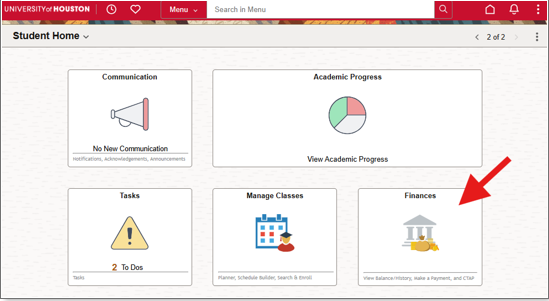
1. Log into your AccessUH account. Upon signing in, select the “Finances” tile:
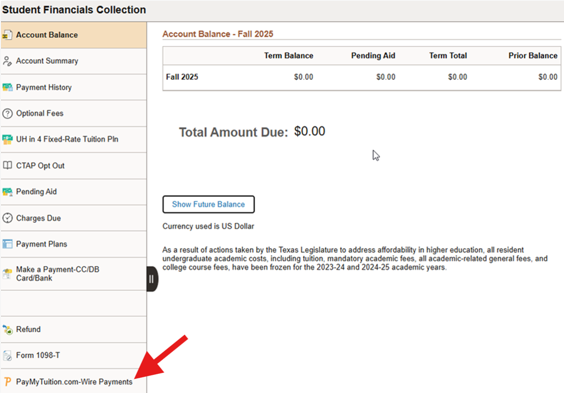
2. From the navigation panel, select "PayMyTuition.com-WirePayments":
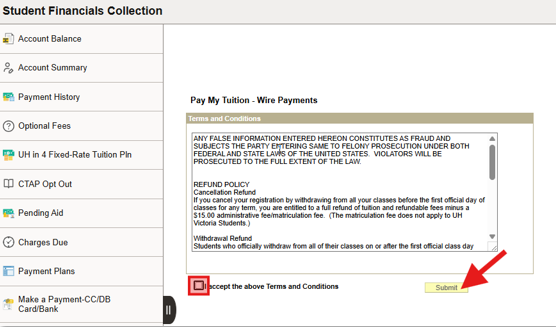
3. Next, accept the Terms and Conditions and click "Submit" to be redirected to the PayMyTuition portal:
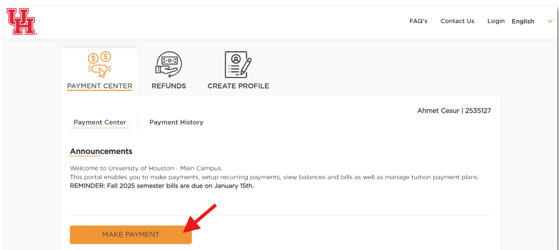
4. Once you are redirected into the PayMyTuition portal, select the "MAKE PAYMENT" button in the Payment Center to initiate your transaction:
5. Follow the steps on the screen to create and fund your payment to the University of Houston.
Step-by-step payment instructions (translated PDFs)
To support you with using PayMyTuition, you can download these helpful step-by-step PDF instructions, translated into several languages:
Additional Information on PayMyTuition:
PayMyTuition’s Rate Guarantee for International Payers
How to Add an Authorized User to the Students’ PayMyTuition Account