Make a Call - Skype for Business
Select your version:

- Hover your mouse over a Contact’s picture.
- Click the Handset icon that appears.
Watch a short video on making a call with Skype for Business!
Watch a short video on making a call with Lync 2013!
Skype for Business (SFB) for Mac
Choose one of three options to make a call: 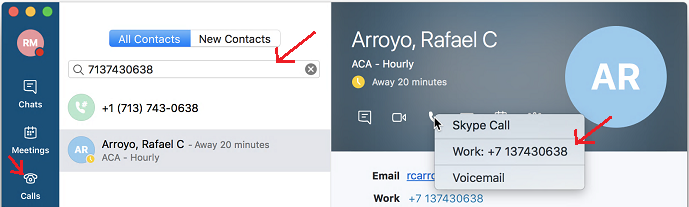
- Enter a contact or phone number in the Search field.
- Select a Contact or phone number, click the Telephone icon at the bottom of the window and select Skype Call.
- Click the Calls tab and use the dial pad to make a call.
How to make a call - Skype for Business for Mac
For Skype for Business (SFB) related questions or problems, send email to sfbsupport@uh.edu.